

Why Does My LED TV Have Sound but No Picture After Last Night's Storm in Durg?
This is the call we take most often between late May and August. The TV was fine during the evening serial, a thunderstorm rolled over Durg, the power flickered twice, and in the morning the screen stays black while the sound plays normally. Shine a torch close to the screen and you can just make out a faint image. That one symptom tells a technician a lot: the panel and mainboard are probably alive, and the problem is almost certainly in the backlight or the power supply that feeds it.
LED TV repair in Durg follows clear patterns once you know what the city's weather and power do to a television. Below are the faults we see most, what usually causes each one and how we repair it.
The Faults That Bring Most Durg TVs to Us
Sound but no picture, or a very dark picture
Cause: one or more LED backlight strips behind the panel have failed. Budget and mid-range TVs drive their LEDs hard to save cost, and heat shortens their life. A surge can also knock out the LED driver section. What we do: open the set in a dust-controlled way, test each strip, and replace the full set of strips rather than just the dead one, since the rest are usually close behind.
TV completely dead, standby light off
Cause: a failed power supply board, often a blown fuse, burst capacitor or damaged regulator after a voltage spike. What we do: repair the board at component level where it is economical, or fit a replacement board matched to the model.
Standby light on, but the TV will not start or restarts in a loop
Cause: mainboard or firmware trouble, a corrupted software update on a smart TV, or a failing power board that cannot hold the load. What we do: check supply voltages, try a firmware recovery, and only then look at the mainboard.
Lines, half-screen image or colour patches
Cause: a T-con board fault, loose ribbon cable, or damage to the panel itself from pressure or a fall. What we do: test the T-con and reseat cables. If the panel is cracked or its internal connections have failed, we will tell you honestly, as explained below.
HDMI or set-top box not detected
Cause: a damaged HDMI port, often from plugging cables in while the set-top box and TV were on separate earthing, or from a surge that came in through the cable line. What we do: replace the port or the HDMI section of the mainboard.
Smart TV slow, apps crashing, no Wi-Fi
Cause: full storage, outdated software or a weak Wi-Fi module. What we do: a software reset and update first, and module replacement only if the hardware is actually at fault.
Why These Faults Are So Common in Durg
Storm season surges. Durg sits on the open plains of central Chhattisgarh, and the weeks before and during the monsoon bring strong thunderstorms. Lightning near overhead lines sends surges into houses through both the mains and the DTH or cable wiring. Power boards and HDMI ports take most of the damage.
Heat. A Durg summer pushes room temperatures well above 35°C indoors for weeks. A TV mounted flush to a wall, inside a closed wooden unit or above a cooler, cannot shed the heat its LEDs and power board produce. Heat is the main reason backlight strips burn out in three or four years instead of lasting much longer.
Voltage swings. Evening dips when coolers and ACs run, followed by spikes when supply is restored after a cut, stress the capacitors on the power board.
Dust. The Durg-Bhilai industrial belt and the dry months leave fine dust everywhere. It collects in TV vents and on boards, trapping heat and, in the humid monsoon months, absorbing moisture that can lead to leakage on the circuitry.
Is it the TV, or the set-top box and internet?
Before booking, it is worth separating a real TV fault from a signal problem. "No signal" on the screen, a frozen channel or a blank screen with the DTH logo usually means the dish, the set-top box or its cable, especially after heavy rain when dishes on rooftops shift or water gets into connectors. Apps refusing to load on a smart TV often trace back to the router or a broadband outage. Press the TV's own menu or home button: if the TV menu appears clearly, the TV itself is very likely fine. If the screen stays black even for the TV's own menu, or the power light behaves oddly, then it is a job for us.
Wall mounts in old and new Durg homes
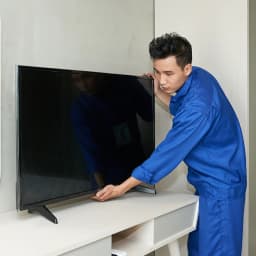
Many sets in Durg are wall-mounted on brackets fitted in a hurry, sometimes into old plaster or hollow blocks. A TV that has slipped or been knocked often shows panel lines later. When we visit, we check that the bracket is anchored properly and that cables are not pulling on the ports.
How a TV Repair Visit Goes
- Our technician checks the socket voltage, the earth and the extension or stabiliser the TV is plugged into.
- The symptom is confirmed with you, including any error blinks from the standby light.
- Simple causes are ruled out: remote, input source, set-top box, cables, software.
- For internal faults, the back cover is removed and each board tested with the TV powered on.
- You are told what has failed and given a quote before any repair starts.
- Smaller board-level repairs are often done at home; backlight and panel-area work may need the set taken to our bench, with your agreement.
- After the repair the TV is run long enough to confirm it is stable.
Panels, Parts and Plain Talk
We would rather lose a job than oversell one. A few facts every TV owner in Durg should know:
- A broken or failed panel is usually not worth replacing. The panel is the most expensive part of an LED TV. On most models, a new panel costs close to, or more than, a new TV of the same size. We will check, but we will not push it.
- Backlight repair is the most common worthwhile repair. It restores the full picture at a fraction of the TV's price.
- Power and mainboards vary. Some are repairable at component level; some are only available as complete boards; for a few older or less common models, spares are hard to find. We tell you which case yours is.
- Genuine and compatible parts both exist. We use genuine spares where they are available and good-quality compatible ones where they are not, and we say which one you are getting.
The price of any repair depends on the brand, screen size and which board is involved, so we only quote after diagnosis.
A Year-Round Care Calendar for Your TV in Durg
| Period | Risk | What to Do |
|---|---|---|
| March to May | Heat build-up behind wall-mounted sets | Leave 10 cm space; avoid placing above a cooler; reduce brightness a little |
| Late May to July | Lightning and surges | Unplug TV and set-top box during storms; use a surge protector |
| July to September | Humidity entering vents | Run the TV daily so internal heat keeps boards dry |
| October to November | Festival-time heavy viewing | Dust vents with a soft brush; update smart TV software |
| December to February | Low risk | Good time for any pending repair or wall-mount re-fixing |
Areas of Durg We Cover
Civil Lines, Mohan Nagar, Padmanabhpur, Kasaridih, Shankar Nagar, Tamerpara, Ganjpara, Station Road, Gaya Nagar, Deepak Nagar, Malviya Nagar, Borsi, Pulgaon, Adarsh Nagar, Rajendra Park, Sindhi Colony, Shanti Nagar, Utai, Charoda and Kumhari, as well as nearby Risali and Supela.
TV Brands We Repair
LED, smart and 4K televisions from Samsung, Sony, Mi and Xiaomi, OnePlus, TCL, Vu, Panasonic, Thomson and Realme, in sizes from 24 to 65 inches and above. AC Care India is an independent electronics and appliance repair service and has no authorisation from these manufacturers; brand names are mentioned purely to show which sets we handle. If your TV is still under warranty, please contact the brand directly first.
Why People in Durg Trust Us With Their TV
- Trained, background-verified technicians who carry proper test equipment.
- A firm quote before work begins, no surprise charges later.
- Warranty cover on the repair and on any parts fitted.
- Same-day or next-day visits across most of the city.
- Honest advice when a panel failure means a new TV is the better buy.
Book LED TV Repair in Durg
Call 9266608882 or book online through this page. Tell us the brand, screen size and exactly what you see or hear. If the TV failed during a storm, mention it, and keep it unplugged until our technician arrives.
